How to use the phone in first person in GTA 6
The phone in GTA 6 can be shown in first person. The row is called Phone Display, sits on the Camera tab under Comfort, and has two choices: Default and First Person.
First-hand · Xbox Series S · captured 19 November 2026, 02:41 UTC
Steps
- Pause the game and choose Settings, the last entry of the pause menu.
- Press RB or LB until the Camera tab is lit. It is tab 6 of 8.
- Move down to the section Comfort and select Phone Display.
- Press left or right to change the value. The change takes effect at once.
- Press B to go back. X restores the selected row to its default.
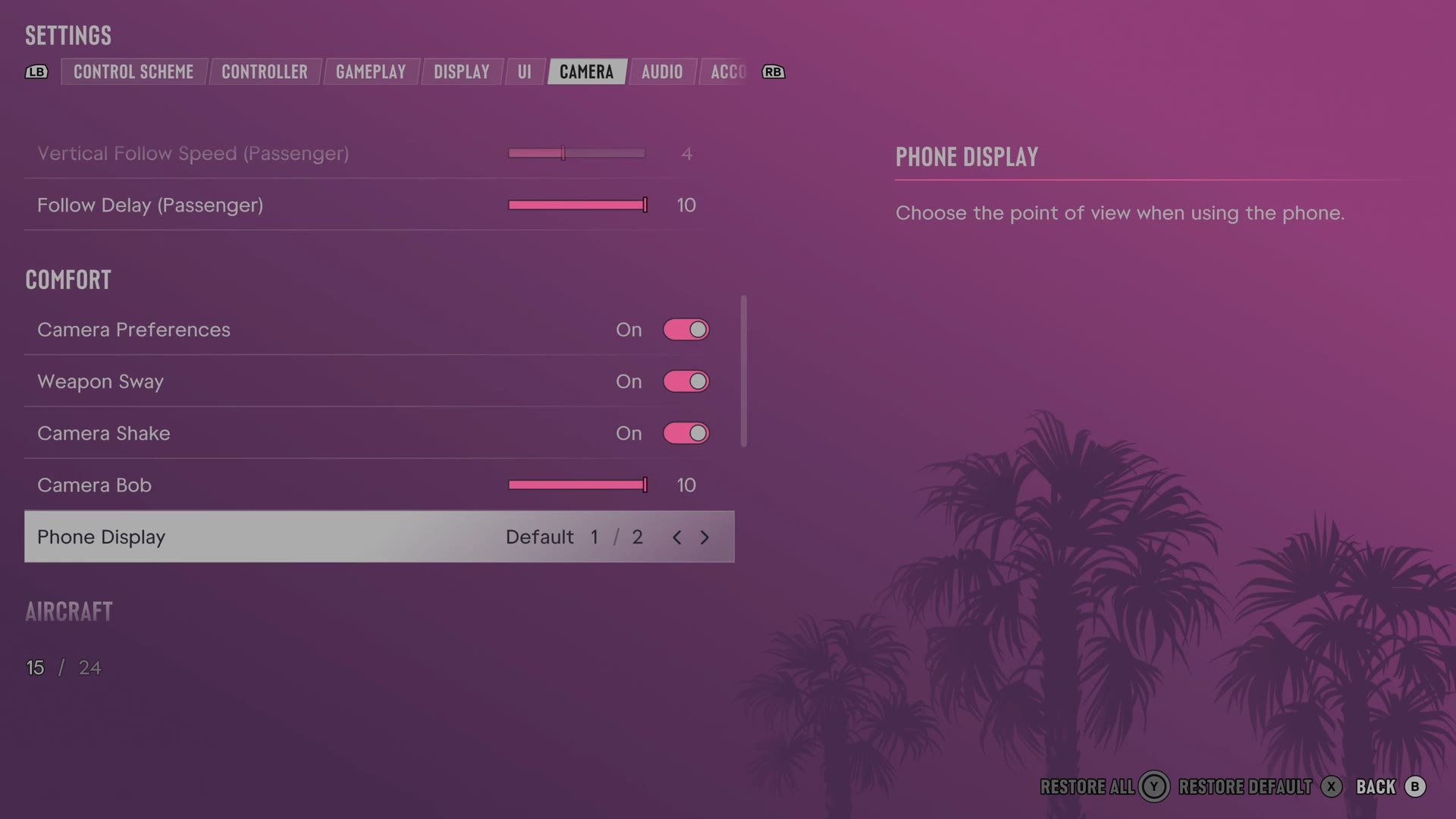
The row
Phone Display
Chooses the camera view used while you use the phone.
2 choices Default · First Person
Every row of this tab: GTA 6 camera settings: follow speed, camera shake and cinematic shots. The whole screen: GTA 6 settings on Xbox Series S.