GTA 6 walk and run speed: the Movement settings
How fast your character moves with the left stick fully pushed is a setting in GTA 6. Movement Speed has four choices: Walk, Fast Walk, Jog and Run. Combat has a row of its own with three choices.
First-hand · Xbox Series S · captured 19 November 2026, 02:39 UTC
Steps
- Pause the game and choose Settings, the last entry of the pause menu.
- Press RB or LB until the Gameplay tab is lit. It is tab 3 of 8.
- Move down to the section Movement and pick the row you want: Movement Speed, Combat Movement Speed and Stand & Sprint.
- Press left or right to change the value. The change takes effect at once.
- Press B to go back. X restores the selected row to its default.
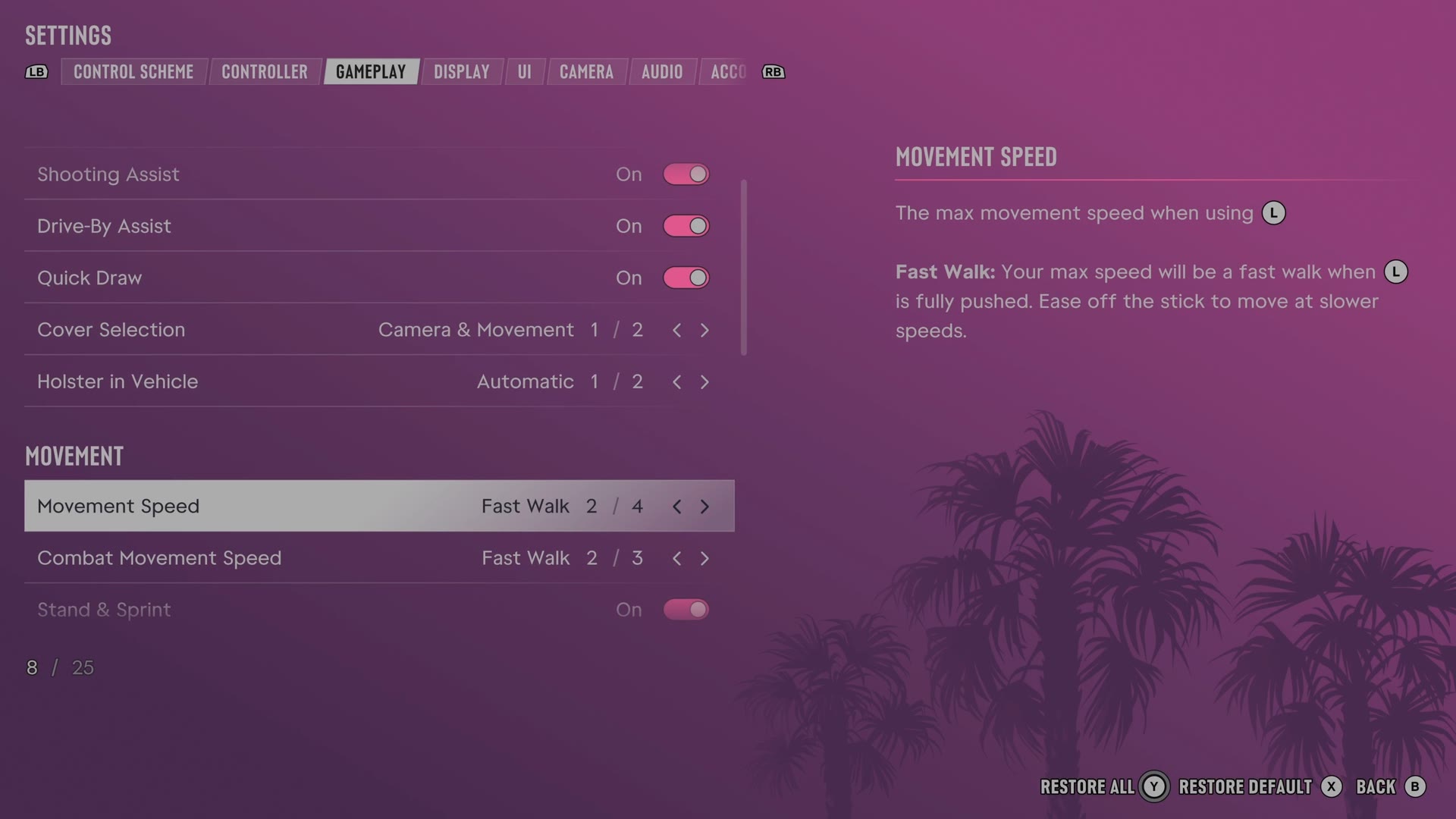
The rows
Movement Speed
Sets your highest movement speed when pushing the movement stick fully.
4 choices Walk · Fast Walk · Jog · Run
What the game says about each choice
- Walk
- The max movement speed when using L Walk: Your max speed will be a walk when L is fully pushed.
- Fast Walk
- The max movement speed when using L Fast Walk: Your max speed will be a fast walk when L is fully pushed. Ease off the stick to move at slower speeds.
- Jog
- The max movement speed when using L Jog: Your max speed will be a brisk jog when L is fully pushed. Ease off the stick to move at slower speeds.
- Run
- The max movement speed when using L Run: Your max speed will be a run when L is fully pushed. Ease off the stick to move at slower speeds.
Combat Movement Speed
Sets your movement speed in combat unless your normal movement setting is faster.
3 choices Walk · Fast Walk · Run
What the game says about each choice
- Walk
- The movement speed when using L during combat. Your default movement speed will override this setting if it's faster. Walk: Your max speed will be a walk when L is fully pushed.
- Fast Walk
- The movement speed when using L during combat. Your default movement speed will override this setting if it's faster. Fast Walk: Your max speed will be a fast walk when L is fully pushed. Ease off the stick to move at slower speeds.
- Run
- The movement speed when using L during combat. Your default movement speed will override this setting if it's faster. Run: Your max speed will be a run when L is fully pushed. Ease off the stick to move at slower speeds.
Stand & Sprint
Chooses whether sprinting automatically makes you stand from a crouch.
Switch On on our console
Every row of this tab: GTA 6 gameplay settings: targeting, aim assist and accessibility. The whole screen: GTA 6 settings on Xbox Series S.