GTA 6 inventory: loadout, trunk, weapons and wardrobe
The loadout holds two sidearms and two longarms at once. A weapon you buy is owned by both Jason and Lucia, and a weapon you pick up is not owned at all. The Inventory tab of the Help menu explains the loadout, the trunk, stash bags, weapons and clothes.
First-hand · Xbox Series S · captured 19 November 2026, 02:59 UTC
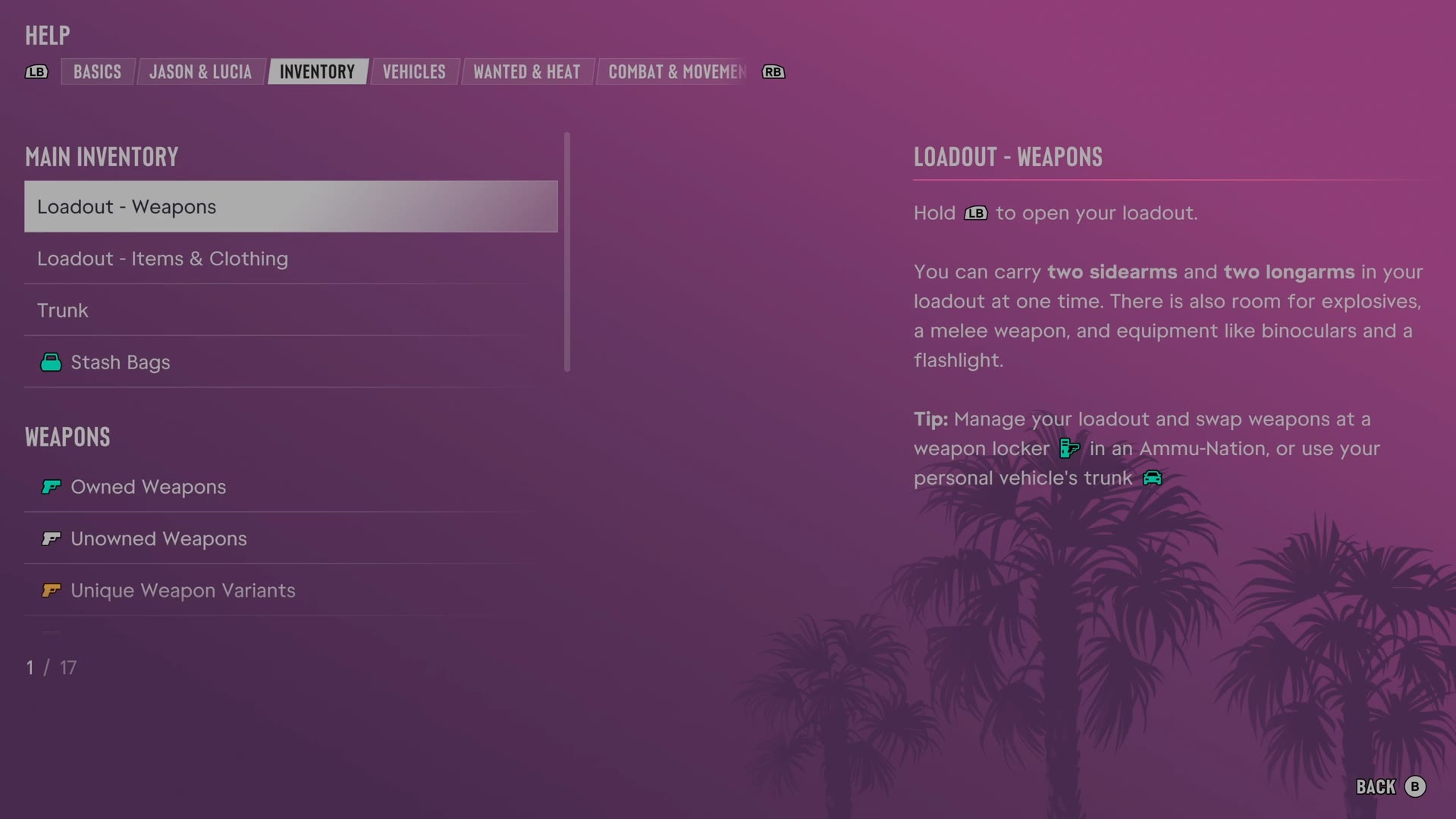
The game's manual is in the pause menu under Help. LB and RB switch tabs, and Inventory is tab 3 of 8. It has 17 entries. We read every one and give each here in our own words.
Loadout - Weapons · Loadout - Items & Clothing · Trunk · Stash Bags · Owned Weapons · Unowned Weapons · Unique Weapon Variants · Buying Weapons · Storing Weapons · Weapon Stats · Equipment & Packs · Wardrobe · Outfits · Accessories · Clothing Stores · Headphones · Helmets
Loadout - Weapons
- Holding LB opens the loadout.
- The loadout holds two sidearms and two longarms at once.
- The loadout also has room for explosives, a melee weapon, binoculars and a flashlight.
- A weapon locker at an Ammu-Nation or a personal vehicle trunk allows loadout management and weapon swaps.
Loadout - Items & Clothing
- Hold LB and press RB to display loadout items.
- The loadout lists carried smokes, accessories and gear.
- The A button equips or removes accessories.
- The D-pad changes the wear style of some clothing.
- Changing accessories can stop cops from recognizing an appearance.
Trunk
- A personal vehicle trunk stores and transports items and supports loadout weapon swaps and outfit changes.
- An unowned vehicle trunk transports items but cannot manage the loadout or change outfits.
- Stash bags in a trunk may be lost if the cops are not escaped after hitting a location.
Stash Bags
- Valuables collected during a robbery enter the stash bag.
- Stash bags can be transported in a vehicle trunk to a drop-off.
- The loadout, opened with LB, shows stash bag contents and value.
- A bag lost through accidental death or in a less populated area may be recoverable.
- The map opened with View shows whether a lost bag remains.
Owned Weapons
- Weapons purchased at Ammu-Nations around Leonida become owned weapons.
- A purchased weapon is available to both Jason and Lucia, with separate modifications and equipment choices.
- Dropped or lost owned weapons can be recovered from a trunk or weapon locker.
- Buying additional weapons expands the product range at Ammu-Nations.
Unowned Weapons
- Unowned weapons come from enemy drops or finds in the world.
- Unowned weapons cannot become owned or receive modifications.
- Lost unowned weapons cannot be recovered.
- Getting wasted or busted removes unowned weapons.
- A trunk can store a limited number of unowned weapons.
Unique Weapon Variants
- Unique weapon variants are special weapons found through exploration and cannot be modified.
- Collecting a unique variant unlocks that variant permanently for both characters.
- A weapon locker switches between customizable owned weapons and discovered unique variants.
- The Weapons section of the Progress menu tracks discovered unique variants.
Buying Weapons
- Ammu-Nation sells new weapons, equipment and modifications.
- Buying much of a store's stock eventually expands the range and unlocks some higher-end products.
- Larger weapon stores have broader selections and exclusive cosmetic options.
Storing Weapons
- Most Ammu-Nations contain a weapon locker.
- Weapon lockers recover owned weapons, manage loadouts and select weapon variants.
- Weapons can also be moved to a personal vehicle trunk for access while traveling.
Weapon Stats
- Ammu-Nations sell modifications that improve weapon stats and performance.
- Weapon attachments include custom grips, magazines and optics.
- Suppressors and tactical flashlights can be attached or removed through the loadout.
- Other attachments require an Ammu-Nation for management.
- Holding LB shows weapon stats and attached modifications in the loadout.
- Holding LB with a weapon equipped compares stats with a weapon found on the ground.
Equipment & Packs
- Ammu-Nations sell equipment including body armor, ammo packs and explosives packs.
- Purchased ammo and explosives packs are delivered to the personal vehicle trunk.
- Removing packs from the trunk refills ammunition for equipped weapons and explosives.
- Extra trunk equipment allows supplies to be replenished while traveling or before a job.
Wardrobe
- The safehouse wardrobe holds purchased clothing and allows clothes changes.
- Moving R left or right spins the character for inspection while choosing clothes.
- The RT button zooms in when choosing clothes.
- While zoomed in, D-pad focuses on different clothing items.
- Some stores have changing rooms for clothes changes.
Outfits
- The wardrobe can save up to 10 custom outfits.
- A personal vehicle trunk can carry up to five outfits for changing while traveling.
- An outfit change can stop cops from recognizing the character.
- A wanted character without spare clothes can steal an outfit from a clothing store.
Accessories
- The wardrobe manages accessories such as masks, headwear and eyewear.
- Accessories can be equipped or removed in the loadout.
- The personal vehicle trunk holds up to three accessories of each type.
- Changing all worn accessories can stop cops from recognizing the character after a crime.
- Saving found accessories in the wardrobe prevents loss when changing outfits.
Clothing Stores
- Clothing stores offer different choices for Jason and Lucia.
- The map index categorizes discovered clothing stores from thrift shops to formalwear.
- Purchased clothes enter the wardrobe of Jason or Lucia.
Headphones
- Electronics stores sell headphones, accessed through the loadout with LB followed by RB.
- Headphones enable radio listening while on foot.
- Holding D-pad selects a radio station, and A switches headphones on or off.
- A fight can knock headphones off, leaving the headphones to be picked up afterwards.
Helmets
- Every motorcycle, scooter and bicycle includes a helmet.
- Helmets are accessed in the loadout with LB then RB.
- The Gameplay tab of Settings can make helmets equip automatically.
The other tabs of the manual: Basics · Jason & Lucia · Vehicles · Wanted & Heat · Combat & Movement · Money · Exploration. All of them: the GTA 6 Help menu.