GTA 6 wanted level and Heat: how the cops find you and how to get away
Losing the cops does not end a chase in GTA 6. Heat stays around your last known location, and a new crime or being spotted there brings the wanted level back. The Wanted & Heat tab of the Help menu explains the stages of a police response, what cops can recognise you by, and the ways to get away.
First-hand · Xbox Series S · captured 19 November 2026, 02:58 UTC
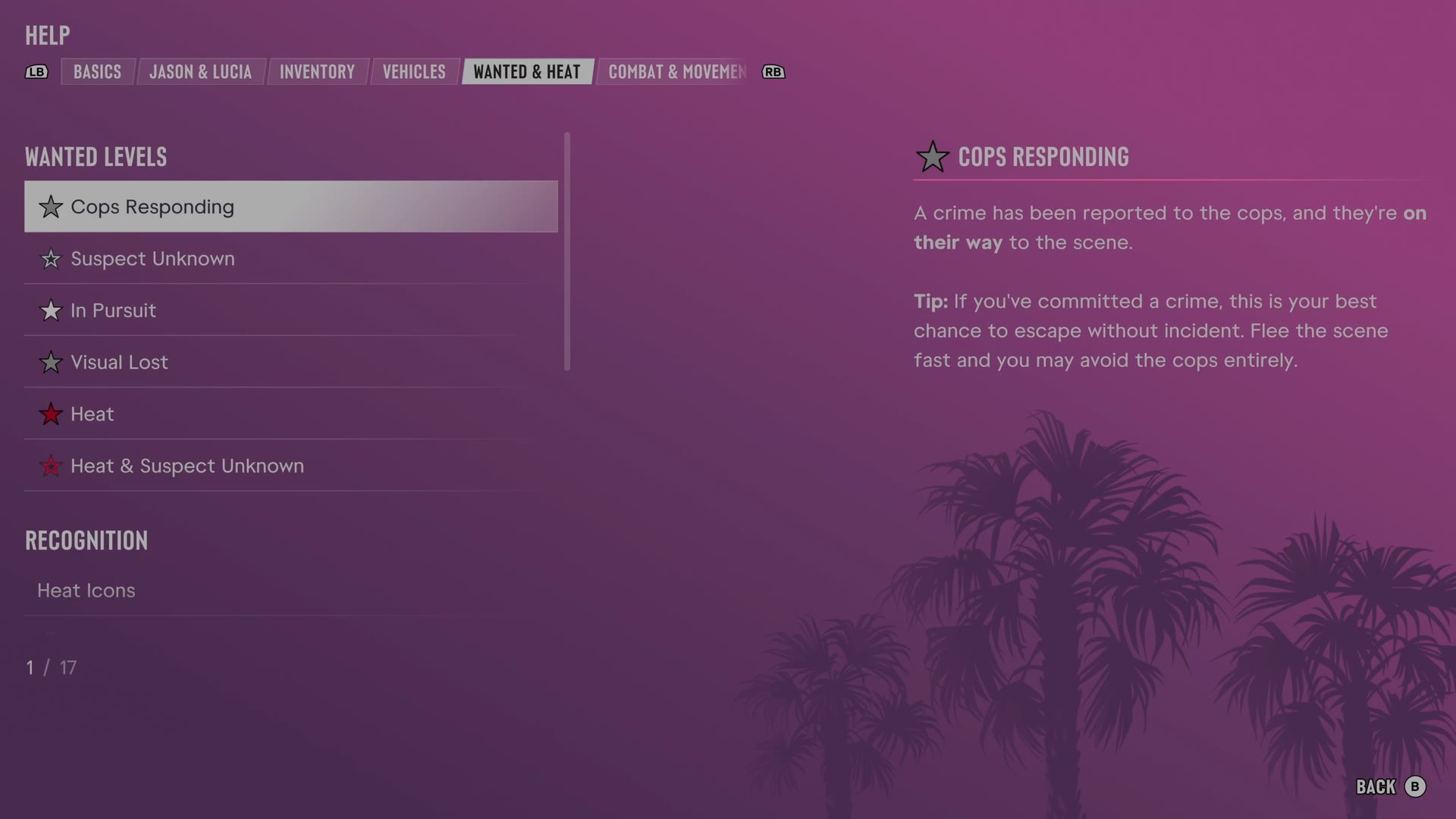
The game's manual is in the pause menu under Help. LB and RB switch tabs, and Wanted & Heat is tab 5 of 8. It has 17 entries. We read every one and give each here in our own words.
Cops Responding · Suspect Unknown · In Pursuit · Visual Lost · Heat · Heat & Suspect Unknown · Heat Icons · Appearance · Vehicle · Outfit · Visible Weapon · CCTV · Stay Out of Sight · Keep Moving · Tactical Gunfire · Wasted & Busted
Cops Responding
- Cops Responding means a crime has been reported and police are traveling to the scene.
- Leaving the crime scene quickly during this stage may avoid any encounter with cops.
Suspect Unknown
- Suspect Unknown means an incident has been reported but police do not know the character's identity.
- A low profile makes linking an unknown suspect to the crime difficult.
- Leaving without attracting attention may avoid a pursuit.
In Pursuit
- In Pursuit means police have visual contact and know the character's identity.
- More serious offenses raise Wanted Level and intensify the police response.
- Slowing cops gives a better escape chance than shooting to kill.
- Shooting cop car tires slows pursuit.
- Shooting at police helicopters may cause the helicopters to retreat.
Visual Lost
- Visual Lost means cops are still pursuing and searching despite losing sight of the character.
- Leaving the search radius unseen makes wanted stars flash and eventually ends the pursuit.
- Staying hidden long enough loses cops, but Heat may remain nearby.
Heat
- Losing cops leaves Heat around the last known location, shown on the map.
- Being spotted or committing another crime in an area with Heat restores Wanted Level.
- Leaving the area or hiding avoids being seen.
- A change of appearance or vehicle lowers the chance of recognition.
Heat & Suspect Unknown
- Heat & Suspect Unknown means cops have no visual description of the character, partner or vehicle.
- Police still search the area with Heat despite having little basis for immediate recognition.
- A new crime in the area risks recognition and a renewed Wanted Level.
Heat Icons
- Heat icons show the information cops can use for identification after a crime.
- Recognition icons cover appearance, vehicle, outfit and partner.
- Other Heat icons indicate a visible weapon, CCTV footage or cloud CCTV footage.
- Clearing recognition icons makes escaping an area with Heat much easier.
The panel scrolls further than our picture shows. This is the part we could read.
Appearance
- Accessories equipped or removed through the loadout with LB change a face that cops may recognize.
- A salon or barber can change hairstyles and appearance.
- A mask covers the face during a crime and can be removed once out of sight.
Vehicle
- A respray or a different vehicle changes a ride that cops recognize.
- An installed tracker may prevent Pay 'n' Spray from servicing some vehicles.
Outfit
- Changing clothes replaces an outfit cops recognize.
- A personal vehicle trunk can carry spare clothes.
- Some stores allow clothing theft while wanted for a quick outfit change.
Visible Weapon
- A visible weapon can attract extra attention from cops or civilians.
- Pressing LB quickly holsters a weapon.
- Sidearms can be concealed on the character, while longarms cannot.
- Longarms can be dropped or stored in a vehicle trunk to keep the weapons out of police sight.
CCTV
- Some businesses use CCTV, and footage of a crime can identify the character once cops arrive.
- Regular CCTV stores recordings on site, where recordings can be destroyed.
- Cloud CCTV footage cannot be destroyed and eventually triggers an alarm.
Stay Out of Sight
- The player arrow changes color according to whether the character is hidden or the cops know the location.
- Ladders and unlocked doors offer ways to evade police.
- Woodland and bushes provide hiding options in rural areas.
- Holding B ducks and hides the character in a stationary vehicle.
- Called-in K9 units track relentlessly and can find a character who stops moving.
Keep Moving
- Keeping moving and leaving the wanted radius improves the chance of escaping police pursuit.
- Vaulting and climbing on foot sometimes provide extra escape routes.
- A timed A press slides across an obstructing vehicle hood without losing momentum.
- Gunfire can activate some door and gate controls to open a route.
- Breaking police line of sight makes escape easier.
Tactical Gunfire
- Killing cops causes a more aggressive police response.
- Shots to non-lethal areas or body armor incapacitate cops without escalating the response.
- Suppressing fire slows a police approach even without hits.
- Pressing RB fires a sidearm while driving.
Wasted & Busted
- Getting wasted or busted by cops removes pocket cash and charges a small BuckMe maintenance fee.
- Getting wasted or busted removes unowned weapons and will most likely lose carried stash bags.
- Owned weapons remain recoverable from a personal vehicle trunk or an Ammu-Nation weapon locker.
- Depositing cash at an ATM lowers the risk of cash loss.
- Trunk stash bags may be lost if cops are not escaped after hitting a location.
Still locked on our save
One entry was closed when we read the tab. The game says to continue Jason and Lucia's story to learn more: Partner.
The other tabs of the manual: Basics · Jason & Lucia · Inventory · Vehicles · Combat & Movement · Money · Exploration. All of them: the GTA 6 Help menu.