GTA 6 vehicles: personal vehicles, trackers, shops, driving and flying
Jason and Lucia can each own one personal vehicle, and a lost or destroyed personal vehicle can always be recovered. An unowned vehicle cannot. The Vehicles tab of the Help menu covers ownership, trackers, damage and fuel, the shops, breaking in, and the buttons for driving and flying.
First-hand · Xbox Series S · captured 19 November 2026, 02:57 UTC
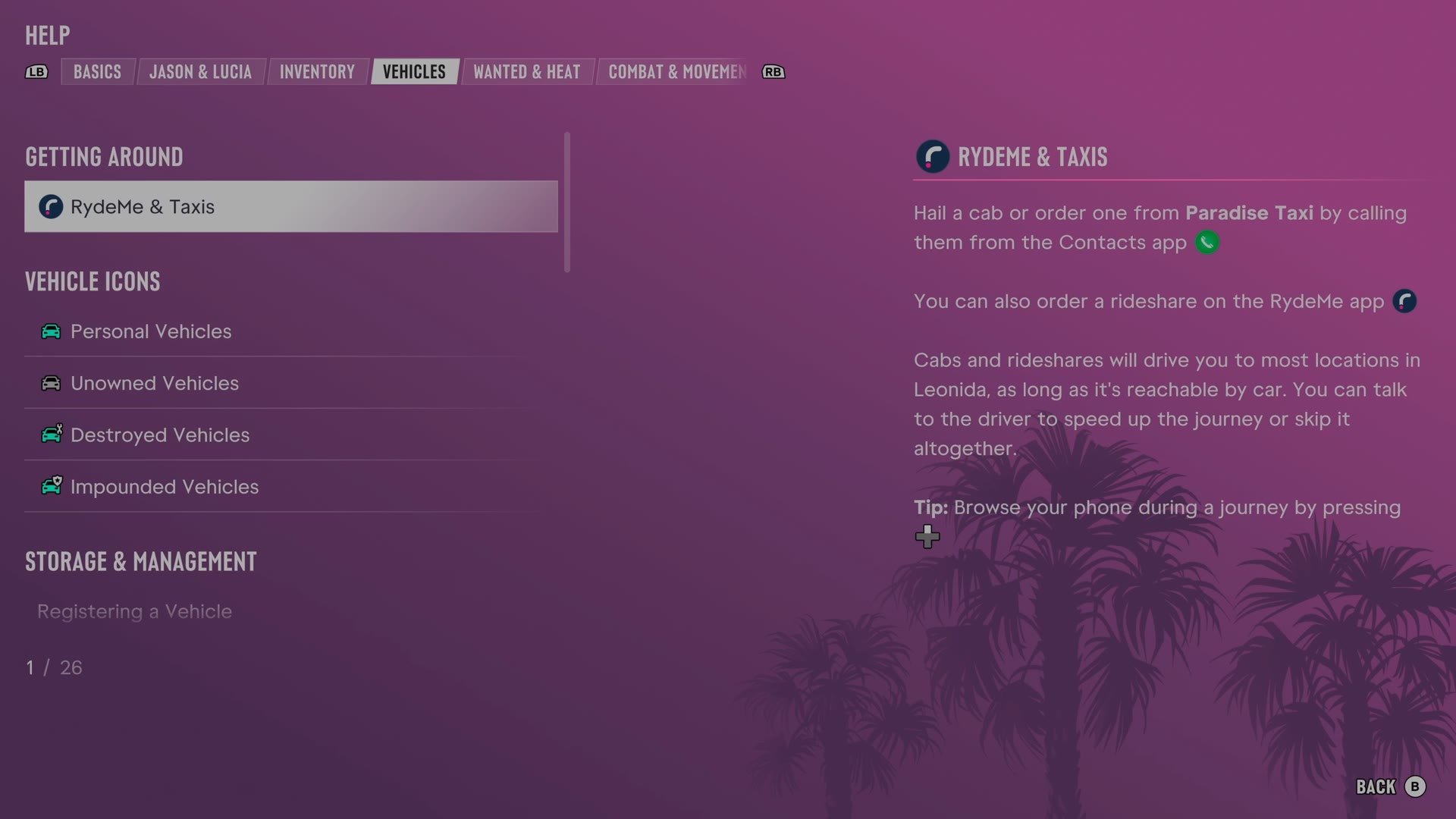
The game's manual is in the pause menu under Help. LB and RB switch tabs, and Vehicles is tab 4 of 8. It has 26 entries. We read every one and give each here in our own words.
RydeMe & Taxis · Personal Vehicles · Unowned Vehicles · Destroyed Vehicles · Impounded Vehicles · Scanning & Inspecting Vehicles · Standard Trackers · Advanced Trackers · Engine Damage · Fuel · Mod Shops · Pay 'n' Sprays · Breaking Into Cars · Hotwiring · Radio & Vehicle Functions · Shooting While Driving · Ducking in Vehicles · Sharp Turns · Exiting a Vehicle · Vehicle Melee Attacks · Taunting While Driving · Pushing a Vehicle · Flying a Plane · Landing a Plane · Flying a Helicopter
RydeMe & Taxis
- Cabs can be hailed or ordered by calling Paradise Taxi through Contacts.
- The RydeMe app orders rideshares.
- Cabs and rideshares reach most Leonida destinations accessible by car.
- Speaking to the driver can speed up or skip a trip.
- Pressing D-pad allows phone browsing during a ride.
Personal Vehicles
- A personal vehicle is legally registered to the character, and Jason and Lucia can each own one.
- A lost or destroyed personal vehicle can always be recovered.
- Personal vehicle trunks support loadout management, outfit changes and storage or transport of items such as stash bags.
- A personal vehicle is always marked on the map opened with View and listed under Personal.
Unowned Vehicles
- The map opened with View marks the most recently driven unowned vehicle.
- Lost or destroyed unowned vehicles cannot be recovered.
- Getting wasted or busted removes items from an unowned vehicle trunk.
- Standout vehicles found around Leonida have unique parts that can be lost when removed at a mod shop.
- Holding X when breaking into a trunk clears the trunk and allows storage of your own items.
Destroyed Vehicles
Spoiler: this entry names a story character
- Enough damage destroys a vehicle and makes the vehicle undrivable.
- A destroyed personal vehicle can be recovered, while a destroyed unowned vehicle is lost permanently.
- Calling Joey through Contacts arranges a vehicle repair or delivery.
- Holding X beside a vehicle on its roof or side attempts to push the vehicle back onto the wheels.
Impounded Vehicles
- A personal vehicle may be impounded when the character gets wasted or busted by cops while using the vehicle.
- The Personal section of the map index opened with View shows an impounded vehicle's location.
- Trunk bags may be lost or locked inside a nearby police vehicle.
- An impounded vehicle and stash bags can be stolen back, with a risk of cops identifying the character.
Scanning & Inspecting Vehicles
- Holding D-pad opens WAiNK, and holding RB scans a vehicle.
- A vehicle scan reveals stats, condition and security, including alarms and trackers.
- Pressing LB at the hood of a vehicle previously entered inspects the engine and details.
- Holding D-pad while driving shows vehicle information.
Standard Trackers
- Some vehicles contain standard trackers.
- A tracked vehicle cannot be modified before registration to the character.
- Once the service is available, Pay 'n' Spray can register vehicles with standard trackers or buy the vehicles for cash.
- WAiNK scans reveal whether a vehicle has a tracker.
- Pressing D-pad while driving shows vehicle stats on the HUD.
Advanced Trackers
- High-end vehicles often have advanced trackers that alert cops when the vehicle is stolen.
- An advanced tracker reports the vehicle location to cops unless the vehicle is moving fast.
- A tracked vehicle requires registration before modification.
- Once available, Pay 'n' Spray can register or buy an advanced-tracker vehicle.
- WAiNK can scan for trackers, or D-pad shows vehicle stats on the HUD while driving.
Engine Damage
- Impacts and other hazards damage vehicle engines.
- Engine condition indicators distinguish good condition, moderate damage, critical damage and a destroyed engine.
- Pay 'n' Spray and mod shops repair vehicles.
- Gas stations also provide minor repairs.
Fuel
- The HUD warns when vehicle fuel runs low.
- Green, amber and red fuel indicators represent high, low and empty levels.
- Gas stations refill fuel.
- Electric vehicles recharge at electric charging stations.
Mod Shops
- Mod shops change vehicle performance or appearance.
- While driving, the map shows the mod shop specializing in the current vehicle type.
- Specialist shops offer special parts and services.
- Pro builds install a custom set of modifications and cosmetics.
- Different shops offer modifications for optimizing vehicle stats.
Pay 'n' Sprays
- A Pay 'n' Spray respray clears vehicle Heat.
- Pay 'n' Spray also repairs vehicle damage.
- Once unlocked, Pay 'n' Spray buys stolen vehicles and registers a new personal vehicle for a fee.
- Pay 'n' Spray cannot be entered while cops still have a visual on the character.
Breaking Into Cars
- Pressing Y checks whether a parked vehicle door is locked.
- Pressing X smashes a window for quick but noisy entry.
- A stopped engine may require hotwiring after entry.
- Keyless vehicles require a key cloner to start.
- Breaking a window can trigger a vehicle alarm.
Hotwiring
- Starting the engine after breaking into a locked vehicle requires hotwiring.
- Hotwiring uses L and R together at the right positions to fill the semi-circles.
- Keyless vehicles cannot be physically hotwired and require suitable theft tools.
Radio & Vehicle Functions
- Holding D-pad inside a vehicle opens the radio.
- Holding D-pad and moving R displays vehicle functions such as headlights and windows.
- Headphones from electronics shops allow radio listening on foot.
Shooting While Driving
- Pressing LB while driving draws a sidearm, and RB fires the sidearm.
- Holding LB selects an installed vehicle weapon when the vehicle has one.
Ducking in Vehicles
- Holding B inside a vehicle ducks the character down to hide from cops.
- A parked vehicle can provide this hiding option after traveling on foot.
Sharp Turns
- Holding A during a fast turn performs a handbrake turn and drift.
- Handbrake turns can quickly change direction or make a U-turn.
- The same turning action works with watercraft for tight turns.
Exiting a Vehicle
- Holding Y while driving brings the vehicle to a complete stop before exiting.
- Double-tapping Y exits a parked or moving vehicle and leaves the engine running.
- Exiting this way at sufficient speed jams the accelerator and sends the vehicle forward.
- Double-tapping Y on a boat leaves the engine running and the boat on course while allowing movement around the vessel.
Vehicle Melee Attacks
- Pressing X in a vehicle hits a nearby person with the door.
- Pressing X on a bike or scooter kicks alongside the vehicle.
Taunting While Driving
- The RB button makes the character give the middle finger from a vehicle.
- Pressing R3 makes the character yell at nearby drivers or pedestrians.
Pushing a Vehicle
- Approaching a vehicle from the front or rear and moving L pushes the vehicle.
- Holding X makes the push harder.
- Pushing can move a vehicle that has no fuel or is otherwise immobilized.
- Holding X beside a vehicle on its side or roof attempts to push the vehicle onto the wheels.
Flying a Plane
- Holding RT accelerates a plane, while LT slows the plane.
- The L stick controls left or right roll and aircraft pitch.
- Holding X or B changes yaw for small left or right adjustments.
- Holding LB selects a weapon on an armed aircraft.
- Entering an aircraft automatically equips a parachute for emergency exits.
Landing a Plane
- Holding LT lowers plane speed for landing, and L allows a steady descent.
- Pressing L3 deploys landing gear when needed.
- Keeping the plane nose raised near the ground is part of the landing procedure until touchdown.
- Choosing the approach early and avoiding late course changes makes landing easier.
Flying a Helicopter
- Holding RT raises a helicopter, and holding LT lowers the helicopter.
- Holding X or B turns a helicopter left or right.
- Helicopter landing uses a gentle descent onto flat ground free of obstacles.
- A helicopter hovers when no controls are used.
Still locked on our save
One entry was closed when we read the tab. The game says to continue Jason and Lucia's story to learn more: Registering a Vehicle.
The other tabs of the manual: Basics · Jason & Lucia · Inventory · Wanted & Heat · Combat & Movement · Money · Exploration. All of them: the GTA 6 Help menu.