Does GTA 6 have a performance mode on Xbox Series S?
Not in the settings screen. We read all 177 rows on our own Xbox Series S on launch night, and none of them sets a frame rate, a resolution, a graphics quality or a performance mode.
First-hand · Xbox Series S · captured 19 November 2026, 02:40 UTC
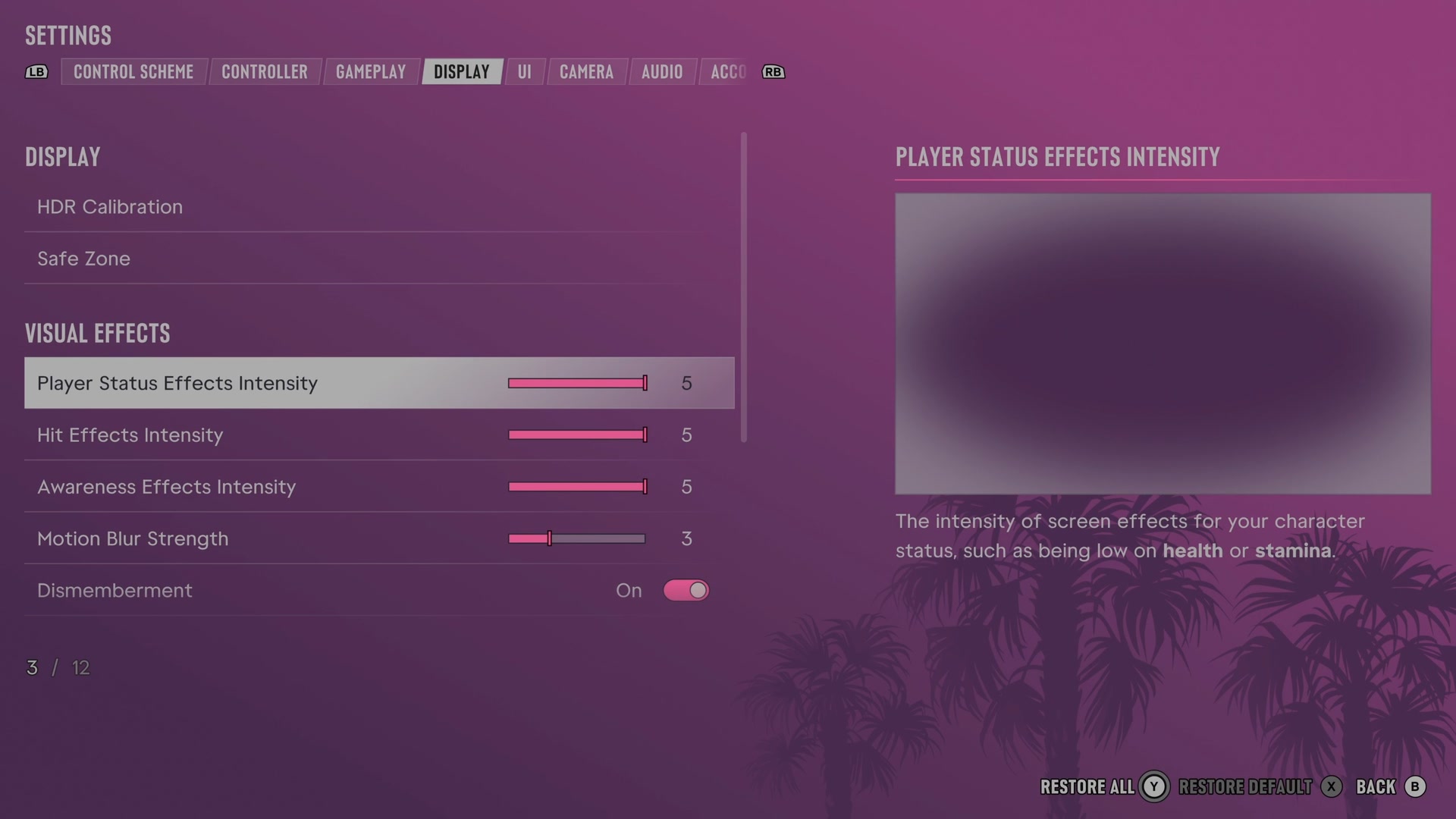
What the Display tab holds
The Display tab is where such a row would sit. It has 12 rows, and these are all of them:
| Row | What it does |
|---|---|
| HDR Calibration | Opens the HDR picture calibration settings. |
| Safe Zone | Sets the area of your screen used by the game. |
| Player Status Effects Intensity | Sets the strength of visual effects that show low health, low stamina and other character conditions. |
| Hit Effects Intensity | Sets the strength of visual effects around the screen when shots or other hits occur. |
| Awareness Effects Intensity | Sets the strength of visual warnings about police and threats outside the camera view. |
| Motion Blur Strength | Sets how much fast movement blurs the picture. |
| Dismemberment | Chooses whether certain injuries can show dismemberment. |
| Blood & Gore Intensity | Sets how much blood and gore injuries show. |
| Flashbang | Chooses whether flashbang effects use a light or dark flash. |
| Focus Trail Colorblind Mode | Changes trail colours to make them easier to distinguish with colour blindness. |
| Brightness Reduction | Softens bright lights in the game world without changing the HUD. |
| High Contrast Shaders | Colours characters, objects and interactions for stronger visual contrast. |
Each row in detail: GTA 6 display settings.
The other seven tabs
We read them row by row as well. They set controls, aiming, the HUD, the camera, sound and the account. The lists are here:
- GTA 6 controller settings: sensitivity, deadzones and inverted controls
- GTA 6 gameplay settings: targeting, aim assist and accessibility
- GTA 6 UI and HUD settings: every row, from minimap to reticle
- GTA 6 camera settings: follow speed, camera shake and cinematic shots
- GTA 6 audio settings: volume, GPS voice and muting licensed music
- GTA 6 account settings: Rockstar Games account, GTA+ Boosts and legal screens
What this page does not say
- We have not measured the frame rate or the resolution the game runs at on Xbox Series S, so this page gives no number for either.
- We have read the screen on Xbox Series S only. Another console may show other rows.
- The game changes with updates. This is the screen as it was at the time of the capture above.
The whole screen: GTA 6 settings on Xbox Series S.